
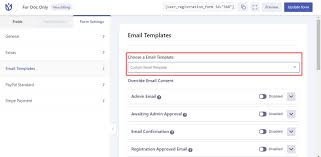
User Registration Email Templates Addon GPL
Original price was: $59.00.$3.99Current price is: $3.99.
- Very cheap price & Original product !
- We Purchase And Download From Original Authors
- You’ll Receive Untouched And Unmodified Files
- 100% Clean Files & Free From Virus
- Unlimited Domain Usage
- Free New Version
- License : GPL
DEMO LINK
DOWNLOAD ALL!
Over 3000+ plugins and themes can be downloaded as a premium member for only $7.99. Become Member Now!User Registration Email Templates Addon GPL
In the digital age, first impressions matter. When users register on your WordPress site, the confirmation emails they receive set the tone for their entire experience. A generic, unbranded email can make your site appear unprofessional, potentially driving users away. This is where the User Registration Email Templates Addon GPL comes into play. By offering customizable, branded email templates, this addon ensures that every communication reflects your site’s identity and engages users effectively.
What Is the User Registration Email Templates Addon GPL?
The User Registration Email Templates Addon GPL is a plugin designed to integrate seamlessly with the WPEverest User Registration plugin. It allows site administrators to customize the email templates sent during user registration, login, password reset, and other user-related actions. With this addon, you can:
-
Create Custom Email Templates: Design emails that align with your brand’s voice and aesthetics.
-
Utilize Pre-built Templates: Choose from a selection of ready-made templates to get started quickly.
-
Override Default Email Content: Replace the default email content with your personalized messages.
-
Customize Design Elements: Modify fonts, colors, layouts, and more to match your site’s theme.
Key Features
1. Drag-and-Drop Email Builder
The addon provides an intuitive drag-and-drop builder, allowing you to design email templates without any coding knowledge. This user-friendly interface ensures that anyone can create professional-looking emails effortlessly.
2. Advanced Customization Options
Customize every aspect of your email templates, including:
-
Typography: Adjust font sizes, styles, and line heights.
-
Colors: Modify text and background colors to align with your brand.
-
Layout: Control padding, margins, and alignment for a polished look.
-
Images: Add logos or banners to enhance brand recognition.
These options ensure that your emails are not only functional but also visually appealing.
3. Live Preview
Before sending out emails, preview them in real-time to ensure they appear as intended. This feature helps catch any design or content errors before they reach your users.
4. Override Default Emails
Replace the default email content with your customized messages for various actions, such as:
- User Registration: Welcome new users with a personalized message.
-
Password Reset: Guide users through the password recovery process.
-
Admin Notifications: Inform administrators about new user registrations.
This ensures consistency in communication and enhances user experience.
5. Pre-built Templates
For those who prefer a quick setup, the addon offers a selection of pre-built templates. These templates can be customized further to suit your specific needs, saving time while maintaining professionalism.
Benefits of Using the Addon
-
Brand Consistency: Ensure that all user communications reflect your brand’s identity.
-
Improved User Engagement: Personalized emails make users feel valued and more likely to engage with your site.
-
Enhanced Professionalism: Well-designed emails convey professionalism and build trust with users.
-
Time Efficiency: Pre-built templates and a drag-and-drop builder streamline the email creation process.
How to Install and Set Up
-
Install the User Registration Plugin: Ensure that the WPEverest User Registration plugin is installed and activated on your WordPress site.
-
Download the Addon: Obtain the User Registration Email Templates Addon GPL from a reputable source.
-
Upload the Addon: Navigate to your WordPress dashboard, go to Plugins > Add New > Upload Plugin, and select the downloaded addon file.
-
Activate the Addon: Once uploaded, activate the addon to enable its features.
-
Access Email Templates: Go to User Registration > Email Templates to start creating and customizing your email templates.
Best Practices for Effective Email Templates
-
Keep It Concise: Ensure that the email content is clear and to the point.
-
Use Personalization: Address users by their first name to create a personal connection.
-
Include Clear Calls to Action: Guide users on the next steps, such as confirming their email or logging in.
-
Test Before Sending: Always preview and test your emails to ensure they display correctly across different devices and email clients.
Considerations When Using the GPL Version
The GPL version of the User Registration Email Templates Addon offers the same features as the premium version but at no cost. However, it’s essential to consider the following:
-
Support: GPL versions may not come with official support, so ensure you have the technical expertise to troubleshoot any issues.
-
Updates: Regularly check for updates to maintain compatibility with the latest WordPress and plugin versions.
Conclusion
The User Registration Email Templates Addon GPL is a powerful tool for enhancing user experience on your WordPress site. By allowing you to create and customize email templates, it ensures that your communications are professional, engaging, and aligned with your brand. Whether you’re a small business owner or managing a large site, this addon provides the flexibility and features needed to improve user interactions and build trust.
Top Hosting Providers
Our site is reader-supported & ad-free. When you purchase through links on our site, we often earn referral fees. Our reviews & rankings are not affected by participation in such programs. Learn More
We have tested more than 117 top hosting providers and handpicked the top Providers for your business. We have tested Server Response Time, Security, Support, Price, and overall speed. We literally love these hosting providers and our honest suggestion will help you get great hosting.
There are many providers that are in business because of advertisements and they charge much more for their shit. You can get a better host, in fact, our #1 recommended host in less price than that.
Top Themes
Here we go for the popular themes: These themes are using one of the popular page builders.
Our site is reader-supported & ad-free. When you purchase through links on our site, we often earn referral fees. Our reviews & rankings are not affected by participation in such programs. Learn More
3. OCEAN WP –CHECK LATEST OFFER
6. ENFOLD – CHECK LATEST OFFER
7. FLATSOME- CHECK LATEST OFFER
8. STUDIO PRESS – CHECK LATEST OFFER
9. GENERATE PRESS – CHECK LATEST OFFER
11. BE THEME – CHECK LATEST OFFER
12. NEWS PAPER – CHECK LATEST OFFER
13. SALIENT – CHECK LATEST OFFER
TOP PAGE BUILDER
TOP PLUGINS
Be the first to review “User Registration Email Templates Addon GPL”
Related products


WP ALL IMPORT

Page Builder


Astra

Cache & Minify

Bundles

Reviews
There are no reviews yet.