
Image Map Pro for WP GPL
Original price was: $39.00.$3.99Current price is: $3.99.
- Very cheap price & Original product!
- We Purchase And Download From Original Authors
- You’ll Receive Untouched And Unmodified Files
- 100% Clean Files & Free From Virus
- Unlimited Domain Usage
- Free New Version
- License: GPL
DEMO LINK
DOWNLOAD ALL!
Over 3000+ plugins and themes can be downloaded as a premium member for only $7.99. Become Member Now!Image Map Pro for WP GPL
In the digital age, engaging your website visitors is paramount. One effective way to achieve this is by incorporating interactive image maps. Enter Image Map Pro for WP GPL—a powerful WordPress plugin that transforms static images into dynamic, clickable experiences. Whether you’re showcasing products, creating detailed floor plans, or presenting interactive infographics, this plugin offers a seamless solution.
What Is Image Map Pro for WP GPL?
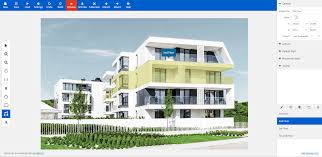
Image Map Pro for WP GPL is a premium WordPress plugin designed to help users create interactive image maps effortlessly. With its intuitive drag-and-drop editor, you can add clickable areas, tooltips, and animations to any image without writing a single line of code. This plugin is perfect for real estate listings, educational content, product showcases, and more.
Key Features of Image Map Pro for WP Plugin
1. Advanced Drag-and-Drop Editor
The plugin’s user-friendly editor allows you to draw custom shapes, pins, and polygons directly on your images. With zoom and pan capabilities, you can achieve pixel-perfect precision. This feature is ideal for creating detailed and interactive maps.
2. Rich Tooltip Content
Enhance user engagement by adding tooltips that appear on hover or click. Utilize the built-in content builder to incorporate text, images, videos, and buttons into your tooltips. This feature is particularly useful for providing additional information or links.
3. Responsive Design
Ensure your interactive maps look great on all devices. The plugin automatically adjusts the layout to fit various screen sizes, providing a consistent experience for users on desktops, tablets, and smartphones.
4. Extensive Icon Library
Access over 600 high-quality FontAwesome SVG icons to use as hotspots on your maps. These icons are fully customizable in terms of size and color, allowing you to match them with your site’s design.
5. Customizable Styles and Animations
Tailor the appearance of your image maps by adjusting properties like opacity, fill, stroke, and corner radius. Additionally, you can apply different styles on mouseover or make shapes completely invisible, adding interactivity to your maps.
6. JavaScript and HTML API
For advanced users, the plugin offers a comprehensive API that allows you to trigger actions when a user clicks on a shape or interacts with a tooltip. This feature enables the integration of custom functionalities into your maps.
7. Import and Export Functionality
Easily transfer your image maps between different websites or projects. The plugin supports importing and exporting maps, making it convenient for developers and agencies working on multiple sites.
Understanding Image Map Pro for WP Nulled Versions
While the allure of a free version might be tempting, it’s essential to consider the implications of using nulled plugins:
-
Security Risks: Nulled plugins may contain malicious code, compromising your website’s security.
-
Lack of Support: Using a nulled version means you won’t receive official support or updates, leaving your site vulnerable to bugs and compatibility issues.
-
Legal Implications: Using nulled plugins violates copyright laws and the plugin’s terms of service.
For a secure and reliable experience, it’s recommended to use the legitimate Image Map Pro for WP GPL plugin.
Why Choose Image Map Pro for WP GPL?
✅ Cost-Effective Solution
The GPL version offers the full functionality of the premium plugin at a fraction of the cost, making it an economical choice for store owners.
✅ Lifetime Updates
Receive lifetime updates, ensuring your plugin remains compatible with the latest WordPress versions.
✅ Use on Unlimited Sites
The GPL license allows you to use the plugin on an unlimited number of websites, providing flexibility for developers and agencies.
How to Set Up Image Map Pro for WP GPL
-
Install the Plugin: Upload and activate the plugin through your WordPress dashboard.
-
Create a New Map: Navigate to the plugin’s interface and upload the image you want to use.
-
Add Hotspots: Use the drag-and-drop editor to place hotspots on the image.
-
Customize Tooltips: Add content to the tooltips using the built-in content builder.
-
Adjust Styles: Modify the appearance of the hotspots and tooltips to match your site’s design.
-
Publish the Map: Insert the generated shortcode into your posts or pages to display the interactive map.
Benefits of Using Image Map Pro for WP Plugin
-
Enhanced User Engagement: Interactive maps capture users’ attention, encouraging them to explore your content further.
-
Improved Navigation: Use image maps to create intuitive navigation menus or product filters.
-
Increased Conversions: Highlight key features or products with clickable hotspots to drive sales.
-
SEO Benefits: Optimized image maps can improve your website’s visibility on search engines.
Where to Get Image Map Pro for WP GPL
You can obtain the Image Map Pro for WP GPL plugin from reputable sources that offer GPL-licensed plugins. Ensure you choose a trusted provider to guarantee the authenticity and security of the plugin.
Final Thoughts
The Image Map Pro for WP GPL plugin is an invaluable tool for WordPress users looking to enhance their website’s interactivity. By integrating with your existing content, it offers a scalable, secure, and efficient solution for creating engaging image maps. Opting for the GPL version ensures you receive all the benefits of the premium plugin at a cost-effective price, with the added advantage of lifetime updates and unlimited site usage.
Top Hosting Providers
Our site is reader-supported & ad-free. When you purchase through links on our site, we often earn referral fees. Our reviews & rankings are not affected by participation in such programs. Learn More
We have tested more than 117 top hosting providers and handpicked the top Providers for your business. We have tested Server Response Time, Security, Support, Price, and overall speed. We literally love these hosting providers and our honest suggestion will help you get great hosting.
There are many providers that are in business because of advertisements and they charge much more for their shit. You can get a better host, in fact, our #1 recommended host in less price than that.
Top Themes
Here we go for the popular themes: These themes are using one of the popular page builders.
Our site is reader-supported & ad-free. When you purchase through links on our site, we often earn referral fees. Our reviews & rankings are not affected by participation in such programs. Learn More
3. OCEAN WP –CHECK LATEST OFFER
6. ENFOLD – CHECK LATEST OFFER
7. FLATSOME- CHECK LATEST OFFER
8. STUDIO PRESS – CHECK LATEST OFFER
9. GENERATE PRESS – CHECK LATEST OFFER
11. BE THEME – CHECK LATEST OFFER
12. NEWS PAPER – CHECK LATEST OFFER
13. SALIENT – CHECK LATEST OFFER
TOP PAGE BUILDER
TOP PLUGINS
Be the first to review “Image Map Pro for WP GPL”
Related products


Astra

Bundles

Payment

Wordpress Plugins

LearnDash LMS


Import & Export

Reviews
There are no reviews yet.