
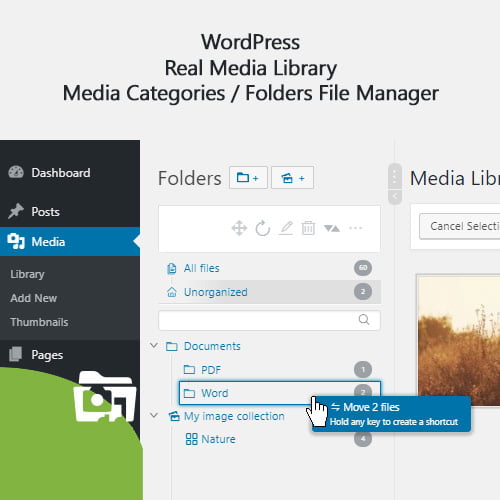
WP Real Media Library GPL
Original price was: $27.00.$3.99Current price is: $3.99.
- Very cheap price & Original product!
- We Purchase And Download From Original Authors
- You’ll Receive Untouched And Unmodified Files
- 100% Clean Files & Free From Virus
- Unlimited Domain Usage
- Free New Version
- License: GPL
DOWNLOAD ALL!
Over 3000+ plugins and themes can be downloaded as a premium member for only $7.99. Become Member Now!WP Real Media Library GPL: Revolutionize Your WordPress Media Management
As a WordPress site owner, you’re likely familiar with the chaos that comes with managing thousands of images, videos, and files. Whether you’re running a blog, an online store, or a portfolio, the clutter in your media library can quickly become overwhelming. Finding specific files, sorting through hundreds or thousands of images, and organizing them in a way that makes sense can be a time-consuming and frustrating task.
But what if there was a way to simplify and streamline the entire process? Enter WP Real Media Library GPL—the ultimate solution for organizing your media files like a pro!
WP Real Media Library plugin is a powerful tool that helps WordPress users effortlessly manage their media files. Whether you’re working with images, videos, PDFs, or audio files, this plugin ensures that everything is neatly categorized and easy to access. It gives you the tools to organize your media files in folders, add tags, and even create galleries, all without the need for complex coding or manual sorting.
Let’s dive deeper into why the WP Real Media Library GPL plugin is a must-have tool for anyone looking to streamline their WordPress site’s media management.
What is WP Real Media Library GPL?
WP Real Media Library GPL is a plugin designed to optimize the way you manage and organize media files in WordPress. The plugin allows you to create folders and subfolders, organize images and files into categories, and use tags to make searching and sorting easier than ever before. Whether you’re managing a few files or thousands, this plugin makes it simple to maintain a neat, organized media library.
The WP Real Media Library plugin goes beyond basic organization by allowing you to integrate your media files into the WordPress media manager directly. It also provides additional features like drag-and-drop functionality, bulk actions, and more, which makes media management not only easy but also intuitive.
In addition, using the WP Real Media Library GPL version ensures you have access to the latest updates and full support without the risks that come with pirated versions, such as WP Real Media Library nulled versions, which can jeopardize your site’s security.
Key Features of WP Real Media Library Plugin
1. Folder and Subfolder Organization:
One of the standout features of the WP Real Media Library GPL plugin is its folder and subfolder organization system. Instead of scrolling through endless pages of media files, you can create folders to group your files by categories or projects. You can even add subfolders to further organize your files and ensure everything is just a click away.
2. Drag-and-Drop Functionality:
Managing media files has never been easier with the WP Real Media Library plugin’s drag-and-drop functionality. Whether you’re uploading files or moving them between folders, you can simply drag and drop them where you need them. This saves time and makes organizing your files quick and painless.
3. Bulk Actions:
Whether you need to move, delete, or update multiple files at once, the WP Real Media Library GPL plugin has you covered. With its bulk action feature, you can perform actions on multiple files simultaneously, drastically reducing the amount of time spent managing your media.
4. Tagging and Metadata:
Adding tags to your media files has never been simpler. WP Real Media Library allows you to tag images, videos, and other media files to make them easier to find later. You can also add metadata to provide additional information, improving the overall organization and accessibility of your files.
5. Gallery Management:
If you’re looking to create galleries on your WordPress site, the WP Real Media Library plugin provides an intuitive gallery management system. You can easily create galleries, add media to them, and display them on your website with minimal effort.
6. Image Previews and Thumbnails:
Previewing your images has never been easier. The plugin generates image previews and thumbnails for each file in your media library, so you can quickly see what you’re working with before selecting or editing a file.
7. Customizable Folder Structure:
With WP Real Media Library, you can tailor the folder structure to your needs. Whether you want a simple folder setup or a more complex, multi-level structure, this plugin offers you the flexibility to design a folder hierarchy that works for your workflow.
8. Multisite Support:
If you’re running a multisite network, WP Real Media Library GPL has you covered. The plugin works seamlessly across multiple sites, making it an excellent choice for those managing several WordPress sites under a single network.
9. Integration with Popular Plugins:
WP Real Media Library integrates with several popular WordPress plugins, including WooCommerce, WPBakery Page Builder, and more. This ensures smooth functionality and enhanced features without needing to worry about compatibility issues.
Why You Should Choose WP Real Media Library GPL
You might be wondering why you should opt for the WP Real Media Library GPL version rather than using a free alternative or the WP Real Media Library nulled version. Here are some compelling reasons why the legitimate GPL version is the best choice for your site:
-
Security: When you use a WP Real Media Library nulled plugin, you risk exposing your website to security vulnerabilities. Nulled plugins often contain malware, backdoors, or other malicious code that could compromise your site’s safety. By using the legitimate GPL version, you ensure your website is secure and protected from potential threats.
-
Support and Updates: With the GPL version of the plugin, you get access to regular updates and professional support. The updates keep the plugin functioning smoothly and ensure compatibility with the latest WordPress versions. On the other hand, the nulled version does not provide updates or support, leaving you vulnerable to bugs and security issues.
-
Enhanced Functionality: The WP Real Media Library plugin regularly receives feature improvements, bug fixes, and performance enhancements. By using the official GPL version, you’re guaranteed the best user experience with the latest features and optimizations.
-
No Licensing Issues: Using the GPL version ensures that you’re complying with licensing agreements. This is important not only for the security of your site but also for avoiding any legal complications down the line.
How to Install WP Real Media Library GPL Plugin
Installing the WP Real Media Library GPL plugin is a simple process that can be completed in a few steps:
-
Download the Plugin: First, download the plugin from the official source to ensure you’re using the legitimate version.
-
Upload the Plugin to WordPress: Log in to your WordPress dashboard and go to “Plugins” > “Add New.” Click the “Upload Plugin” button and select the downloaded plugin file.
-
Install and Activate the Plugin: After uploading, click “Install Now” and then activate the plugin to start using it.
-
Configure the Settings: Once activated, go to the plugin settings and customize it according to your preferences. You can start creating folders, organizing your files, and exploring all the features the plugin has to offer.
Final Thoughts
The WP Real Media Library GPL plugin is a game-changer when it comes to organizing your media files in WordPress. Whether you’re managing a few images or thousands of files, this plugin makes it easy to keep everything organized, accessible, and optimized for your site. From drag-and-drop functionality to advanced folder management, the plugin provides everything you need to manage your media with ease.
Remember, while the WP Real Media Library nulled version may seem like a tempting option, it’s always better to choose the legitimate GPL version to ensure your site’s security, performance, and long-term stability.
With WP Real Media Library GPL, you’ll experience smoother workflows, better organization, and a more professional approach to managing your media. Give your WordPress site the upgrade it deserves!
Top Hosting Providers
Our site is reader-supported & ad-free. When you purchase through links on our site, we often earn referral fees. Our reviews & rankings are not affected by participation in such programs. Learn More
We have tested more than 117 top hosting providers and handpicked the top Providers for your business. We have tested Server Response Time, Security, Support, Price, and overall speed. We literally love these hosting providers and our honest suggestion will help you get great hosting.
There are many providers that are in business because of advertisements and they charge much more for their shit. You can get a better host, in fact, our #1 recommended host in less price than that.
Top Themes
Here we go for the popular themes: These themes are using one of the popular page builders.
Our site is reader-supported & ad-free. When you purchase through links on our site, we often earn referral fees. Our reviews & rankings are not affected by participation in such programs. Learn More
3. OCEAN WP –CHECK LATEST OFFER
6. ENFOLD – CHECK LATEST OFFER
7. FLATSOME- CHECK LATEST OFFER
8. STUDIO PRESS – CHECK LATEST OFFER
9. GENERATE PRESS – CHECK LATEST OFFER
11. BE THEME – CHECK LATEST OFFER
12. NEWS PAPER – CHECK LATEST OFFER
13. SALIENT – CHECK LATEST OFFER
TOP PAGE BUILDER
TOP PLUGINS
Be the first to review “WP Real Media Library GPL”
Related products

Wordpress Plugins

Codecanyon

Advertising

Codecanyon

WordPress Brands

WordPress Brands


Codecanyon

Reviews
There are no reviews yet.