
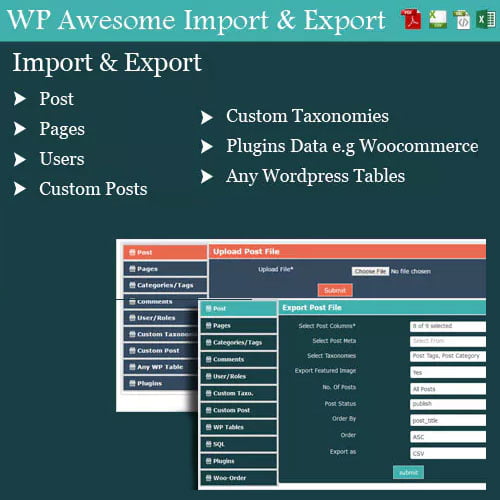
WP Awesome Import & Export Plugin
Original price was: $26.00.$3.99Current price is: $3.99.
- Very cheap price & Original product!
- We Purchase And Download From Original Authors
- You’ll Receive Untouched And Unmodified Files
- 100% Clean Files & Free From Virus
- Unlimited Domain Usage
- Free New Version
- License: GPL
DOWNLOAD ALL!
Over 3000+ plugins and themes can be downloaded as a premium member for only $7.99. Become Member Now!Unlock Seamless Data Migration with the WP Awesome Import & Export Plugin
Are you looking for an easy and efficient way to manage data migration on your WordPress site? Whether you’re moving content, settings, or user data between websites or importing bulk data from a CSV, the WP Awesome Import & Export Plugin is the ultimate solution to simplify your WordPress management tasks.
Managing a WordPress site can be a breeze when you have the right tools. With the WP Awesome Import & Export Plugin, you can seamlessly import and export data, making it incredibly easy to move content between different sites. This plugin streamlines the process, saving you valuable time and effort. Let’s dive into how this powerful tool can enhance your WordPress experience.
What is the WP Awesome Import & Export Plugin?
The WP Awesome Import & Export Plugin is a highly versatile WordPress plugin designed to help website owners, administrators, and developers easily import and export all kinds of data to and from WordPress. Whether you are migrating content, users, settings, or even custom fields, this plugin handles it all.
This plugin allows you to export your WordPress data (posts, pages, comments, custom post types, taxonomies, users, and more) to CSV or XML files, and import them back into your WordPress site. It’s a perfect solution for site migration, backups, and even bulk content uploads.
With an easy-to-use interface and powerful features, this plugin makes it simple to handle complex data management tasks that would otherwise require a lot of time and technical expertise.
Key Features of the WP Awesome Import & Export Plugin
-
Seamless Data Migration The WP Awesome Import & Export Plugin simplifies the process of transferring data from one WordPress site to another. Whether you’re migrating content, themes, plugins, or user data, this plugin makes the transition smooth and error-free. No more manual copying and pasting—just export and import with ease.
-
CSV and XML Support The plugin supports both CSV and XML file formats for importing and exporting. These formats are ideal for handling bulk data and are compatible with a variety of external tools, making it easy to integrate this plugin with other systems.
-
Customizable Import/Export Options You can customize your import and export options to fit your specific needs. For instance, you can choose which content types (posts, pages, comments, etc.) to include in the export, as well as whether or not to include metadata, custom fields, or taxonomies. This level of customization ensures that you only export or import the data you need.
-
Scheduled Imports and Exports With the WP Awesome Import & Export Plugin, you can automate your data migration tasks. The plugin allows you to schedule imports and exports, saving you time and ensuring that your data is always up to date. This feature is especially helpful if you’re frequently moving content or updating information from an external source.
-
Bulk Import and Export If you have large amounts of data to move, this plugin can handle bulk imports and exports effortlessly. You can import or export thousands of posts, pages, comments, or other content types in one go, without worrying about performance issues or time constraints.
-
Error-Free Import/Export Process One of the most frustrating things when managing data is encountering errors during the import or export process. With the WP Awesome Import & Export Plugin, you can rest assured that your data will be transferred smoothly without errors. The plugin includes error-checking tools that will notify you if any issues arise, ensuring a seamless process every time.
-
User-Friendly Interface The plugin features an intuitive and easy-to-use interface, making it accessible to users of all experience levels. Whether you’re a beginner or an experienced WordPress user, you’ll find the plugin simple to navigate. There’s no need for any coding knowledge—just a few clicks and your data is ready to go.
-
Import and Export Content with Media Files The WP Awesome Import & Export Plugin allows you to import and export not only the content (posts, pages, etc.) but also the media files (images, videos, audio, etc.) associated with that content. This feature is essential when migrating a website to a new domain or server, as it ensures that all media files are preserved and transferred correctly.
-
Advanced Filtering Options When exporting data, you have the option to filter the content by categories, tags, authors, or even custom fields. This helps you export only the data you need, reducing the clutter and ensuring that your export files are clean and organized.
-
Multilingual Support For websites that cater to a global audience, the WP Awesome Import & Export Plugin supports multilingual content. You can import and export content in multiple languages, making this plugin a great tool for managing international sites.
How Does the WP Awesome Import & Export Plugin Benefit You?
-
Simplified Data Migration If you’re migrating to a new host or moving your content to a new domain, the WP Awesome Import & Export Plugin takes the hassle out of transferring data. By handling everything automatically, it removes the risk of errors that can occur with manual migrations.
-
Save Time on Content Updates If you’re managing a large website with tons of content, it can be time-consuming to make updates. With the bulk import and export features, you can update multiple posts, pages, or users at once, saving valuable time and effort.
-
Effortless Site Backups This plugin makes it easy to back up your WordPress site by exporting all of your content and settings into a CSV or XML file. Should anything go wrong, you can easily import your backup and restore your site without losing data.
-
Improved Website Management Managing multiple sites becomes easier with the WP Awesome Import & Export Plugin. You can quickly transfer content between your sites or set up a new site with the same content in just a few clicks. This streamlines your workflow and helps you manage your WordPress sites with ease.
-
Support for Custom Post Types and Taxonomies If you’re using custom post types (CPT) or custom taxonomies on your site, this plugin supports them as well. You can import or export custom post types and taxonomies just as easily as standard content types.
Why You Should Avoid Using WP Awesome Import & Export Plugin Nulled Versions
While you may come across nulled versions of the WP Awesome Import & Export Plugin online, it’s important to understand the risks associated with using these pirated copies.
-
Security Risks Nulled plugins are often modified versions of the original plugin, and they can contain malicious code or malware. By using a nulled plugin, you could inadvertently expose your website to hackers, leading to data loss, website downtime, or security breaches.
-
Lack of Updates and Support When you use a nulled version of the WP Awesome Import & Export Plugin, you won’t receive any updates or access to customer support. This means you’ll miss out on important security patches and new features, leaving your site vulnerable and outdated.
-
Legal and Ethical Issues Using nulled plugins is illegal and unethical. It’s essential to support developers by purchasing their plugins legally, as this helps ensure that they can continue creating valuable tools for WordPress users.
-
No Guarantee of Performance Nulled versions of plugins may not work as expected and could cause conflicts with other plugins or themes on your site. This could lead to unexpected issues that affect your website’s performance, leaving you with a broken site.
How to Install the WP Awesome Import & Export Plugin
- Download the Plugin: Obtain the WP Awesome Import & Export Plugin from a trusted source.
- Install the Plugin: Go to the Plugins section of your WordPress dashboard and click Add New. Upload the plugin zip file and click Install Now.
- Activate the Plugin: Once installed, click Activate to start using the plugin on your site.
- Configure the Settings: Go to the plugin settings and customize the import/export options according to your needs.
Conclusion
The WP Awesome Import & Export Plugin is an essential tool for any WordPress user looking to streamline data migration, backups, and content management. With its user-friendly interface, customizable options, and powerful features, this plugin simplifies what could otherwise be a complicated task.
Whether you’re migrating your site, importing bulk data, or exporting content for backup purposes, the WP Awesome Import & Export Plugin is the perfect solution to save time and effort. Avoid the dangers of using nulled versions, and make the smart choice by investing in a trusted and reliable plugin for your website.
This description highlights the features, benefits, and risks of using nulled versions, while ensuring that it is informative, SEO-optimized, and easy to understand for potential users. Keywords such as WP Awesome Import & Export Plugin, WP Awesome Import & Export plugin, and WP Awesome Import & Export Plugin nulled are incorporated naturally throughout the text.
Top Hosting Providers
Our site is reader-supported & ad-free. When you purchase through links on our site, we often earn referral fees. Our reviews & rankings are not affected by participation in such programs. Learn More
We have tested more than 117 top hosting providers and handpicked the top Providers for your business. We have tested Server Response Time, Security, Support, Price, and overall speed. We literally love these hosting providers and our honest suggestion will help you get great hosting.
There are many providers that are in business because of advertisements and they charge much more for their shit. You can get a better host, in fact, our #1 recommended host in less price than that.
Top Themes
Here we go for the popular themes: These themes are using one of the popular page builders.
Our site is reader-supported & ad-free. When you purchase through links on our site, we often earn referral fees. Our reviews & rankings are not affected by participation in such programs. Learn More
3. OCEAN WP –CHECK LATEST OFFER
6. ENFOLD – CHECK LATEST OFFER
7. FLATSOME- CHECK LATEST OFFER
8. STUDIO PRESS – CHECK LATEST OFFER
9. GENERATE PRESS – CHECK LATEST OFFER
11. BE THEME – CHECK LATEST OFFER
12. NEWS PAPER – CHECK LATEST OFFER
13. SALIENT – CHECK LATEST OFFER
TOP PAGE BUILDER
TOP PLUGINS
Be the first to review “WP Awesome Import & Export Plugin”
Related products

Codecanyon


Codecanyon

Admin Tools

Codecanyon


Reviews
There are no reviews yet.