
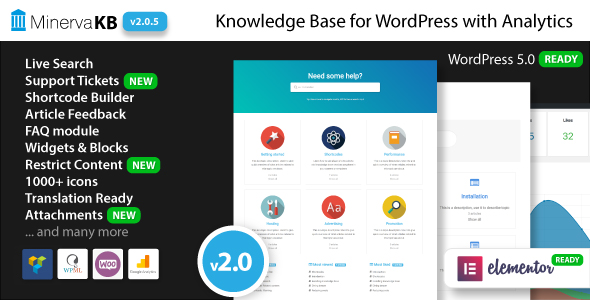
Introduction to MinervaKB Knowledge Base GPL
Customer support is an essential aspect of any successful business. Whether you’re running a small online shop, managing a large e-commerce platform, or offering digital services, providing your users with easy access to information can drastically improve their experience. But how can you manage this efficiently without overwhelming your team or your users?
Enter MinervaKB Knowledge Base GPL – a powerful WordPress plugin designed to help you create a sleek, professional, and user-friendly knowledge base right on your website. MinervaKB Knowledge Base is specifically designed to help businesses, support teams, and even freelancers streamline the process of sharing valuable information with their users. The plugin’s intuitive interface allows you to organize articles, FAQs, guides, and other essential content so your visitors can find what they need quickly.
Whether you are a customer support team, an educational institution, or a software provider, having a reliable and easy-to-use knowledge base is crucial. With the MinervaKB Knowledge Base plugin, you can make sure your users always have access to the information they need, when they need it.
In this product description, we will dive deep into the powerful features of MinervaKB Knowledge Base GPL, why it’s essential for your business, and why you should avoid using MinervaKB Knowledge Base nulled versions of the plugin.
What is MinervaKB Knowledge Base GPL?
MinervaKB Knowledge Base GPL is a flexible and customizable WordPress plugin designed to create knowledge bases, help centers, and FAQs on your WordPress site. Whether you’re creating documentation, how-to guides, troubleshooting articles, or offering support resources, MinervaKB Knowledge Base has all the features you need to ensure your content is organized, easily accessible, and user-friendly.
The plugin boasts a variety of customization options, allowing you to design a knowledge base that fits your site’s style and your business’s needs. You can display your articles in a clean, structured manner that’s both attractive and functional, improving the overall user experience.
Key Features of MinervaKB Knowledge Base GPL
-
Customizable Layouts
One of the standout features of MinervaKB Knowledge Base GPL is its flexibility when it comes to layout options. The plugin offers multiple themes and layouts that allow you to display your knowledge base in a way that’s visually appealing and easy to navigate. Whether you prefer a traditional list view, a more modern grid layout, or a tabbed design, MinervaKB Knowledge Base plugin offers the tools to make it happen. -
Easy-to-Use Interface
With MinervaKB Knowledge Base GPL, setting up and managing your knowledge base is a breeze. The plugin provides an intuitive user interface that is designed for both beginners and advanced users. You don’t need any coding experience to build a comprehensive and professional knowledge base. The plugin’s drag-and-drop functionality makes it easy to add, edit, and categorize content. -
Search Functionality
A knowledge base is only as good as its search feature. MinervaKB Knowledge Base plugin includes a powerful search function that allows users to quickly find the information they need. With features like live search results and filtering options, your users will be able to find articles, FAQs, and guides in no time, improving their experience and reducing the burden on your support team. -
Responsive Design
Today’s users access websites from a variety of devices, including smartphones, tablets, and desktops. MinervaKB Knowledge Base GPL is fully responsive, meaning your knowledge base will look great on all screen sizes. Whether your visitors are browsing from a mobile device or a desktop computer, they will be able to access your support content without any issues. -
Article Categorization and Tags
Organizing your knowledge base content is crucial for both SEO and user experience. The MinervaKB Knowledge Base plugin allows you to categorize and tag your articles, making it easier for your visitors to find related content. By creating specific categories like “Getting Started,” “Troubleshooting,” or “Advanced Features,” you ensure that users are always presented with relevant content. -
Multilingual Support
If your business caters to an international audience, MinervaKB Knowledge Base GPL offers multilingual support, allowing you to create knowledge base articles in multiple languages. This feature is essential for businesses that serve customers around the world, as it ensures everyone can access your support content in their preferred language. -
Advanced Article Features
For more advanced users, MinervaKB Knowledge Base GPL offers a host of additional features, such as the ability to create article hierarchy, implement article ratings, and manage article revisions. These features allow you to refine your knowledge base over time, ensuring that your users have access to the most up-to-date and relevant information. -
Integration with Other Plugins
MinervaKB Knowledge Base plugin integrates seamlessly with other popular WordPress plugins, such as WPML (for multilingual content) and Elementor (for advanced page building). This allows you to extend the functionality of your knowledge base and create a more personalized experience for your users. -
Custom Widgets and Shortcodes
To make your knowledge base even more customizable, MinervaKB Knowledge Base GPL includes custom widgets and shortcodes. These allow you to easily display your most popular articles, recent posts, or even related categories on any page or post within your WordPress site. -
Analytics and Insights
Understanding how users are interacting with your knowledge base is crucial for improving its effectiveness. MinervaKB Knowledge Base GPL includes built-in analytics features, allowing you to track article views, popular searches, and user behavior. With this data, you can fine-tune your content strategy and ensure that your knowledge base is meeting your users’ needs.
Why You Should Use MinervaKB Knowledge Base GPL
-
Enhanced Customer Support
One of the most significant advantages of using MinervaKB Knowledge Base GPL is the way it enhances customer support. By offering your users a dedicated knowledge base, you can reduce support tickets and phone calls, as users can quickly find the information they need on their own. This results in less strain on your support team and a faster resolution for your customers. -
Professional and Polished Appearance
A well-designed knowledge base not only improves usability but also helps establish your business as professional and trustworthy. With MinervaKB Knowledge Base plugin, you can create a knowledge base that fits seamlessly with your site’s branding, offering a cohesive experience that builds customer confidence. -
Improved User Experience
When your users can easily find the information they’re looking for, they’re more likely to engage with your site and return for future visits. MinervaKB Knowledge Base GPL enhances the overall user experience by making it easy for visitors to navigate through your knowledge base content. -
SEO Benefits
Organizing your content with MinervaKB Knowledge Base GPL can help improve your site’s SEO. By creating high-quality, relevant articles, using proper keywords, and optimizing your search functionality, you can drive more organic traffic to your website. The plugin’s clean and SEO-friendly structure ensures that your content is easily indexed by search engines. -
Save Time and Resources
MinervaKB Knowledge Base plugin allows you to create content once and make it available to an unlimited number of users. This saves you time and resources that would otherwise be spent answering the same questions over and over. Your knowledge base acts as a self-service portal, empowering your users to solve problems independently.
The Risks of Using MinervaKB Knowledge Base Nulled
While it may seem tempting to search for a MinervaKB Knowledge Base nulled version, there are several risks associated with using pirated plugins:
-
Security Vulnerabilities
Nulled plugins often contain malicious code or backdoors that can compromise the security of your WordPress site. By using a nulled version, you risk exposing your site to potential hacks, data theft, and malware attacks. -
No Support or Updates
A nulled version does not come with official support or updates. This means you won’t be able to access new features or receive essential security patches. Additionally, if you encounter issues, you won’t have access to the support team to help you resolve them. -
Legal and Ethical Concerns
Using MinervaKB Knowledge Base nulled is illegal and unethical. It violates the plugin’s licensing agreement and puts you at risk of legal action. By using the official GPL version, you ensure that you’re respecting the developers’ work and protecting your business. -
Unreliable Performance
Nulled versions are often unstable, leading to poor performance, errors, or conflicts with other plugins. This can create a frustrating user experience and cause your knowledge base to malfunction.
To ensure a secure, stable, and fully functional knowledge base, it’s always best to use the legitimate MinervaKB Knowledge Base GPL version.
Conclusion
The MinervaKB Knowledge Base GPL is an invaluable tool for any business looking to provide top-notch customer support and enhance user experience. With its customizable layouts, advanced features, and intuitive interface, this plugin offers everything you need to create a professional and efficient knowledge base on your WordPress site.
By investing in the official MinervaKB Knowledge Base plugin, you can streamline your support process, improve customer satisfaction, and drive more traffic to your website. Don’t risk the dangers of using MinervaKB Knowledge Base nulled versions—opt for the official GPL version and enjoy all the benefits of this powerful tool.
SEO Titles & Meta Descriptions:
Title 1:
Create an Engaging Knowledge Base with MinervaKB Knowledge Base GPL
Meta Description 1:
Build a professional, user-friendly knowledge base with MinervaKB Knowledge Base GPL. Improve customer support, streamline navigation, and enhance user experience.
Title 2:
MinervaKB Knowledge Base GPL – The Ultimate Plugin for Support Centers
Meta Description 2:
Transform your website with MinervaKB Knowledge Base GPL. Organize FAQs, guides, and articles for a seamless and effective customer support experience.
Title 3:
Boost Customer Satisfaction with MinervaKB Knowledge Base GPL
Meta Description 3:
Create a polished and professional knowledge base with MinervaKB Knowledge Base GPL. Empower users with easy access to support content and increase engagement.


Reviews
There are no reviews yet.