
Download Monitor Amazon S3 Addon GPL
Original price was: $69.00.$3.99Current price is: $3.99.
- Very cheap price & Original product !
- We Purchase And Download From Original Authors
- You’ll Receive Untouched And Unmodified Files
- 100% Clean Files & Free From Virus
- Unlimited Domain Usage
- Free New Version
- License: GPL
DEMO LINK
DOWNLOAD ALL!
Over 3000+ plugins and themes can be downloaded as a premium member for only $7.99. Become Member Now!Download Monitor Amazon S3 Addon GPL – Deliver Files Securely from the Cloud
Managing large digital files on your WordPress site can be challenging. Whether you’re offering high-resolution images, videos, software packages, or downloadable resources, hosting them directly on your server can slow down your website and drain bandwidth. The solution? Serve your files directly from the cloud using Download Monitor Amazon S3 Addon GPL.
This powerful extension allows you to integrate Amazon S3 cloud storage with your WordPress site through the Download Monitor plugin. With this setup, you can offload your downloads to the highly scalable, secure, and reliable infrastructure provided by Amazon Web Services (AWS).
If you’re looking to scale your download delivery, enhance security, and ensure consistent performance, the Download Monitor Amazon S3 Addon GPL is a must-have tool in your WordPress toolkit.
What Is Download Monitor Amazon S3 Addon GPL?
The Download Monitor Amazon S3 Addon GPL is a premium extension for the Download Monitor plugin, designed to seamlessly connect your WordPress downloads with your Amazon S3 account. Instead of storing files on your local server, this plugin enables you to serve them directly from Amazon S3.
And because it’s released under the GPL (General Public License), you get full rights to use, modify, and install the plugin on unlimited websites. Perfect for developers, freelancers, agencies, and businesses needing complete flexibility and cost-efficiency.
Why Use the Download Monitor Amazon S3 Addon Plugin?
With file sizes increasing and user expectations rising, modern websites need to deliver downloadable content quickly and securely. Hosting files locally can be inefficient, especially if you’re dealing with high traffic or limited server resources.
Here’s why the Download Monitor Amazon S3 Addon plugin is a game-changer:
1. Lightning-Fast File Delivery
Amazon S3 is built on a highly optimized, global cloud infrastructure. Serving files from S3 ensures fast, reliable access to your downloads—no matter where your users are located.
2. Save Server Resources
By offloading downloads to Amazon S3, you reduce the burden on your web host, improving site speed and lowering bandwidth costs.
3. Enhanced Security
Protect your downloads using Amazon S3’s permission settings and signed URLs. Control exactly who can access each file and when.
4. Unlimited Storage
Unlike your hosting provider, S3 offers virtually unlimited storage capacity. You’ll never have to worry about running out of space.
5. Better Scalability
Whether you’re getting 100 downloads per day or 100,000, S3 can handle it. It scales automatically based on demand, making it perfect for high-traffic sites.
6. Seamless Integration
Easily connect your S3 buckets to your Download Monitor setup and start linking files within minutes—no coding required.
Core Features of Download Monitor Amazon S3 Addon GPL
The Download Monitor Amazon S3 Addon GPL includes all the tools you need to deliver your downloads through Amazon S3 with maximum efficiency and minimum effort:
-
Direct S3 Integration: Connect your S3 buckets to your WordPress site directly.
-
Signed URLs: Generate time-sensitive download links to prevent unauthorized sharing.
-
Bucket & Region Selection: Choose the exact bucket and AWS region for each file.
-
Multi-Site Support: Use across multiple WordPress installations under GPL.
-
Download Logging: Track all downloads through Download Monitor’s logging system.
-
Full Control Over File Access: Set access permissions and expiration times.
-
Use with Existing Downloads: Easily migrate existing download files to S3.
-
Automatic File Linking: No need for manual URL input—just select files from your S3 bucket.
-
Regular Updates and Compatibility: Compatible with the latest WordPress and AWS changes.
-
Developer Friendly: Extend or customize functionality as needed with clean, open-source code.
How It Works – Simple Setup in Minutes
Getting started with the Download Monitor Amazon S3 Addon GPL is quick and easy:
-
Install and activate the Download Monitor plugin.
-
Upload and activate the Amazon S3 Addon extension.
-
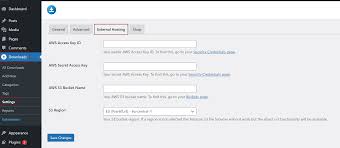
Navigate to the plugin settings and enter your Amazon S3 API keys.
-
Select your S3 bucket and configure your region.
-
When creating a download, choose your S3-hosted file directly from the plugin interface.
-
Optionally, enable signed URLs to restrict access and protect your files.
-
Publish your download, and your users will now receive files served directly from S3.
That’s it—your download delivery system is now powered by one of the most secure and reliable cloud platforms in the world.
Who Should Use Download Monitor Amazon S3 Addon GPL?
This plugin is perfect for anyone who needs to serve large files or wants tighter control over their download delivery. If any of the following describe you, the Download Monitor Amazon S3 Addon GPL will bring massive benefits:
-
Digital Product Creators distributing large media files, courses, or software.
-
Membership Site Owners offering gated or restricted content.
-
Agencies managing multiple WordPress websites and client downloads.
-
Developers needing scalable, secure file delivery for web apps or SaaS tools.
-
Nonprofits and Institutions distributing digital publications, reports, or research.
-
Online Educators sharing video lectures, PDFs, or other course materials.
Regardless of your niche, if your website includes downloadable content, integrating Amazon S3 will dramatically improve the way those files are handled and delivered.
The Risks of Using Download Monitor Amazon S3 Addon Nulled Versions
Tempted to use a Download Monitor Amazon S3 Addon nulled version? Think twice. While these unauthorized versions may appear free, they come with serious risks:
1. Security Vulnerabilities
Nulled plugins often contain malicious code, backdoors, or malware that can compromise your site and user data.
2. No Updates or Support
You won’t receive crucial updates, security patches, or support from the plugin developers.
3. Legal Issues
Using nulled software violates licensing agreements and may lead to penalties, DMCA takedowns, or site blacklisting.
4. Poor Performance and Bugs
Modified code is often poorly written, leading to bugs, compatibility issues, or full-site crashes.
Avoid these problems by using the legitimate Download Monitor Amazon S3 Addon GPL version. You’ll get full freedom under GPL, with none of the risks.
Benefits of Choosing the Official GPL Version
-
Legally Licensed: Safe to use on unlimited projects.
-
Safe and Secure: Clean code without malware or backdoors.
-
Fully Customizable: Modify it to suit your specific needs.
-
Reliable Performance: Optimized to work with WordPress and AWS.
-
Professional Support Access: Documentation, updates, and community support.
-
Developer Friendly: Ideal for agencies and freelancers managing multiple sites.
Final Thoughts – Supercharge Your Downloads with Amazon S3
If you’re serious about delivering high-quality downloads to your users—quickly, securely, and at scale—the Download Monitor Amazon S3 Addon GPL is the smart choice.
It’s fast, flexible, and built for performance. Whether you’re running a small blog with a handful of downloads or a large-scale digital store with thousands of users, this plugin will help you optimize your workflow and reduce your hosting burden.
Don’t take chances with unstable, risky Download Monitor Amazon S3 Addon nulled alternatives. Choose the trusted, GPL-licensed solution that gives you full control and peace of mind.
Top Hosting Providers
Our site is reader-supported & ad-free. When you purchase through links on our site, we often earn referral fees. Our reviews & rankings are not affected by participation in such programs. Learn More
We have tested more than 117 top hosting providers and handpicked the top Providers for your business. We have tested Server Response Time, Security, Support, Price, and overall speed. We literally love these hosting providers and our honest suggestion will help you get great hosting.
There are many providers that are in business because of advertisements and they charge much more for their shit. You can get a better host, in fact, our #1 recommended host in less price than that.
Top Themes
Here we go for the popular themes: These themes are using one of the popular page builders.
Our site is reader-supported & ad-free. When you purchase through links on our site, we often earn referral fees. Our reviews & rankings are not affected by participation in such programs. Learn More
3. OCEAN WP –CHECK LATEST OFFER
6. ENFOLD – CHECK LATEST OFFER
7. FLATSOME- CHECK LATEST OFFER
8. STUDIO PRESS – CHECK LATEST OFFER
9. GENERATE PRESS – CHECK LATEST OFFER
11. BE THEME – CHECK LATEST OFFER
12. NEWS PAPER – CHECK LATEST OFFER
13. SALIENT – CHECK LATEST OFFER
TOP PAGE BUILDER
TOP PLUGINS
Be the first to review “Download Monitor Amazon S3 Addon GPL”
Related products


Codecanyon

Wordpress Themes

Codecanyon


Wordpress Plugins


Reviews
There are no reviews yet.